AI lead follow-up automation connects enquiries with responses, booking and contact records. Artificial intelligence (AI) interprets messages or drafts replies; fixed rules track the next action. Your customer relationship management (CRM) system stores contact details and conversation history. This guide explains the workflow, human checks and costs to assess before building it.
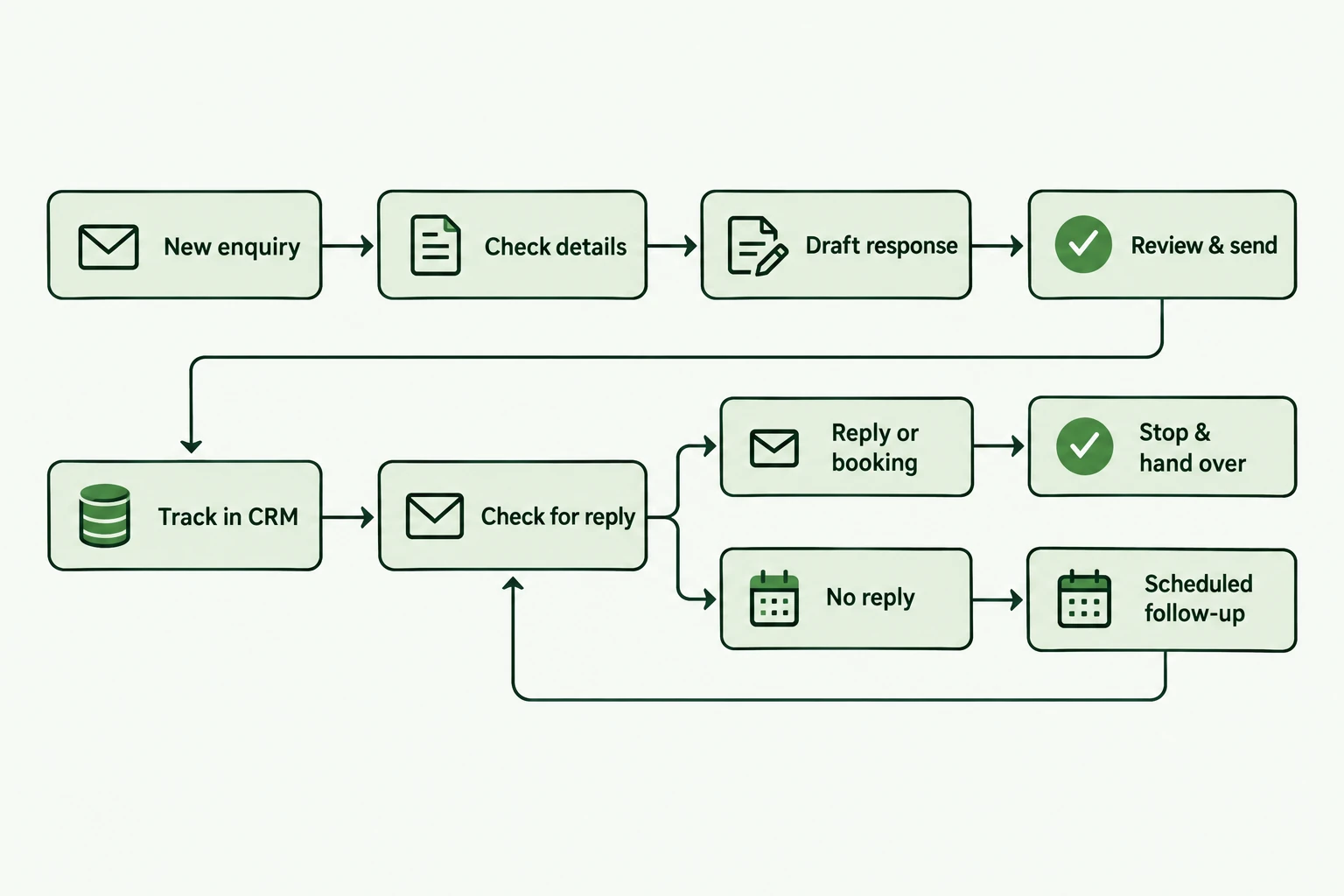
What AI lead follow-up automation does
An automated follow-up system records each enquiry and assigns a next action. It can prepare a response, update a contact record and remind the person responsible. You decide which actions happen automatically and which require approval.
For a service business, that might mean responding to a website enquiry and inviting a suitable prospect to book. The system keeps checking whether they have replied or booked before sending another message. This article covers those inbound enquiries, rather than cold outreach to purchased contact lists.
You can connect your existing CRM or start with a structured tracker. Choose one place to record each lead’s status. Check that your workflow can read the current record before sending messages.
Follow one enquiry from receipt to handover
Consider an agency that receives a request for help onboarding new clients. The enquiry describes the problem but leaves out the number of clients involved. This example illustrates a possible design; it is not a reported client result.
The workflow first checks whether the contact already exists, then records the message. AI summarises the request and drafts a question about client volume. An account manager approves the response before the system sends it.
If the prospect replies, the workflow cancels the pending reminder and alerts the account manager. If they book through a connected calendar, it records the booking and ends the enquiry sequence. If neither happens, the workflow checks the record again before sending an agreed follow-up.
The sequence has six stages:
Capture
Record the enquiry, its source and the contact details in one place.
Check
Validate the required fields and look for an existing contact or open conversation.
Prepare
Summarise the request and draft a response using your approved service information.
Review
Ask the named owner to approve anything outside your agreed sending rules.
Follow up
Check for a reply, booking or stop request before each scheduled message.
Hand over
Send the conversation and relevant details to the person responsible for the next step.
Separate AI interpretation from fixed rules
Use AI where the wording of an enquiry affects the response. It can extract a requested service or prepare a summary for review. Keep predictable actions, such as creating a task, under fixed rules.
An AI agent can choose actions towards a goal, whereas a defined workflow follows paths set in advance. You can add an AI step without giving an agent control over the whole process. Anthropic describes this distinction in its guidance on building effective agents.
| What to compare | Use fixed rules | Use AI with review |
|---|---|---|
| New enquiry | Create a record and assign its owner | Summarise the prospect’s request |
| Qualification | Check required fields against agreed criteria | Extract information from a free-text message |
| Response | Send an approved acknowledgement | Draft a relevant question using confirmed service facts |
| Follow-up | Check status and cancel pending reminders | Suggest wording for the owner to approve |
Set response timing around the enquiry
Choose a response schedule that fits the request and your team’s capacity. An acknowledgement can confirm receipt and explain when someone will respond. It should not imply that a person has reviewed the enquiry if nobody has.
A quote request needs a different follow-up from a request to discuss work next quarter. Define those paths before writing the messages. Test the timing and wording against examples from your own inbox.
For a pilot, you could acknowledge receipt, ask for missing details after review and send one reminder if the conversation stays unanswered. Treat that sequence as a starting design, rather than a universal cadence. Set a final stop point instead of continuing indefinitely.
Stop reminders when the situation changes
Check the lead’s current status immediately before sending each message. A reply can arrive after a reminder enters the queue. Without another status check, the prospect can receive an outdated follow-up during an active conversation.
A calendar link click does not prove that someone booked. Connect the actual booking event to the contact record and test the match. HubSpot’s sequence documentation shows reply and meeting-booking triggers as default reasons to end a sequence.
Keep a route to human review when a system fails or cannot interpret a request. n8n documents a human fallback pattern for AI workflows. Your team also needs to know when that review queue contains unresolved enquiries.
Define these stop or review conditions before launch:
- A prospect replies or books a meeting
- A prospect declines or asks you to stop
- An address fails delivery
- An owner takes over the conversation
- A required tool fails or information is missing
Check the purpose of each customer message
Treat responding to a request and sending promotional messages as separate decisions. Someone asking for a quotation has not necessarily asked to receive an ongoing marketing sequence. Review the purpose and content of each message before automating it.
For UK businesses, the Information Commissioner’s Office (ICO) explains the rules for electronic marketing and the distinction between solicited and unsolicited messages. Use its current guidance when setting your contact rules. Record stop requests and make sure later workflows honour them.
Count implementation and ongoing costs separately
Assess the full cost of the workflow before comparing it with manual work. An initial build and a monthly service cover different responsibilities. Ask who pays for the connected software and who fixes the system when an integration changes.
ParmarWorks automation engagements start at £999 per month with £0 upfront. The agreed scope determines what the service includes. Confirm the contract term, applicable taxes and any third-party charges before treating that starting price as your total cost.
Ask for an itemised view of these costs:
| What to compare | What to confirm |
|---|---|
| Implementation | Process mapping, configuration, testing and handover included in the agreed scope |
| Subscriptions | The workflow platform, CRM and messaging tools you need |
| Usage | AI requests, message sends and workflow runs; check the charging unit for each tool |
| Support | Monitoring, incident handling and the changes covered by the service |
| Your team’s time | Approvals, exceptions, training and ongoing reviews |
Calculate capacity value before assuming cash savings
Estimate the time you can recover after accounting for review work. Suppose you handle 300 enquiries a month, with eight minutes of administration per enquiry. That is 40 hours of monthly work.
If the automated process still needs 12 hours of review, you recover 28 hours. At an assumed internal cost of £30 per hour, that capacity has a value of £840. Your payroll does not automatically fall by that amount.
Using the £999 monthly service starting price and an illustrative £100 tool budget gives recurring costs of £1,099. In this example, recovered time alone does not cover those costs. You would need other measured benefits or a different scope to justify the spend.
Track additional booked work separately from time recovered. Count its contribution after delivery costs rather than treating the full sales value as profit. Compare the results with your starting point before attributing a change to automation.
- Monthly effort before automation
- 40 hours
- Review effort remaining
- 12 hours
- Capacity recovered
- 28 hours
Illustrative calculation, not a client result or a quote. Assumes 300 enquiries × 8 minutes, 12 hours of remaining review, £30/hour internal cost, £999/month service and £100/month tools. Capacity value: £840; recurring costs: £1,099; difference: −£259 before any other measured benefits or taxes.
Choose who owns the build and maintenance
Choose a do-it-yourself (DIY) approach when someone on your team can own a limited workflow and maintain it. Begin with a process that has clear inputs and a reversible action, such as creating an internal task. Check whether your current CRM already supports the behaviour you need.
Consider a managed service when you need help mapping the process or connecting the systems. Agree the support responsibilities before the build starts. Ask for documentation that explains how to pause the workflow and handle exceptions.
Use this checklist to scope your first workflow
Write down the process before selecting tools or asking for a proposal. A one-page brief helps you compare providers against the same requirements. Use these prompts to prepare it:
- Which enquiry source will the pilot cover?
- Which fields must every lead record contain?
- Who approves responses and handles exceptions?
- Which event cancels each scheduled follow-up?
- How can your team pause the workflow?
- What are the setup, monthly and usage costs?
- Which baseline measures will you compare after launch?
Answers to common lead follow-up questions
Your existing tools and approval rules determine the implementation. These answers explain the decisions to make before a pilot.
Can it work with my existing CRM?
Check whether your CRM can create and update contacts, report replies and expose booking status. The available integrations determine what you can connect. A separate tracker can fill a defined gap, but avoid creating conflicting lead records.
Does it need an AI agent?
A fixed workflow can handle reminders and record updates. Add AI when interpreting an enquiry or drafting a response serves a defined purpose. Use an agent only when choosing the next action adds value to the process.
Can I approve messages before they send?
Design an approval step and name the person responsible. Decide what happens when approval is delayed. Keep a record of the approved text and the message that the system sends.
What happens when someone replies?
The workflow should cancel pending follow-ups and assign the conversation to its owner. Test replies from each connected channel. Include out-of-office replies and messages that ask you to stop.
THE TAKEAWAY
Start with one enquiry source, a named owner and tested stop rules. Bring that process to a ParmarWorks discovery call to identify what is worth automating and what should stay with your team.

Nik Parmar
Founder of ParmarWorks. Building practical automation and connected systems for service businesses.